Showing posts with label SkyTrack. Show all posts

Friday, 11 September 2020

Important update of my SkyTrack software [UPDATED]


In the context of the probable landing site of the recent Chinese Experimental Spacecraft (see previous post), I discovered a serious bug in my SkyTrack software.

As it turns out, when your chosen observing site has an altitude well over MSL, the sky positions in RA/DEC and AZIMUTH/ELEV are significantly off in version 2.5. I had not noticed this before, as my own observing location is at MSL.

The reason for this error is stupid: the SGP4 DLL needs an altitude in km, while in my code I failed to convert the site altitude from meters to kilometers....hence, a site at 995 meter was treated as if was a site at 995 km...oopsie!

Anyway: I have corrected the error and the new version 2.6 is now for download at my software website.


UPDATE 12 Sep 2020:

A second important bug fix was made, leading to version 2.7 now downloadable.

It corrects an error where, when adding a new site, southern latitudes and western longitudes were incorrectly written to the database...


Starting version 2.6, I also included a few lines of code that should solve another problem and forces the software to recognize the dot as the decimal separator during runtime of the program, no matter what your regional windows setting is. This likewise avoids output errors.

For those unfamiliar with the software, there is an earlier blogpost detailing it.

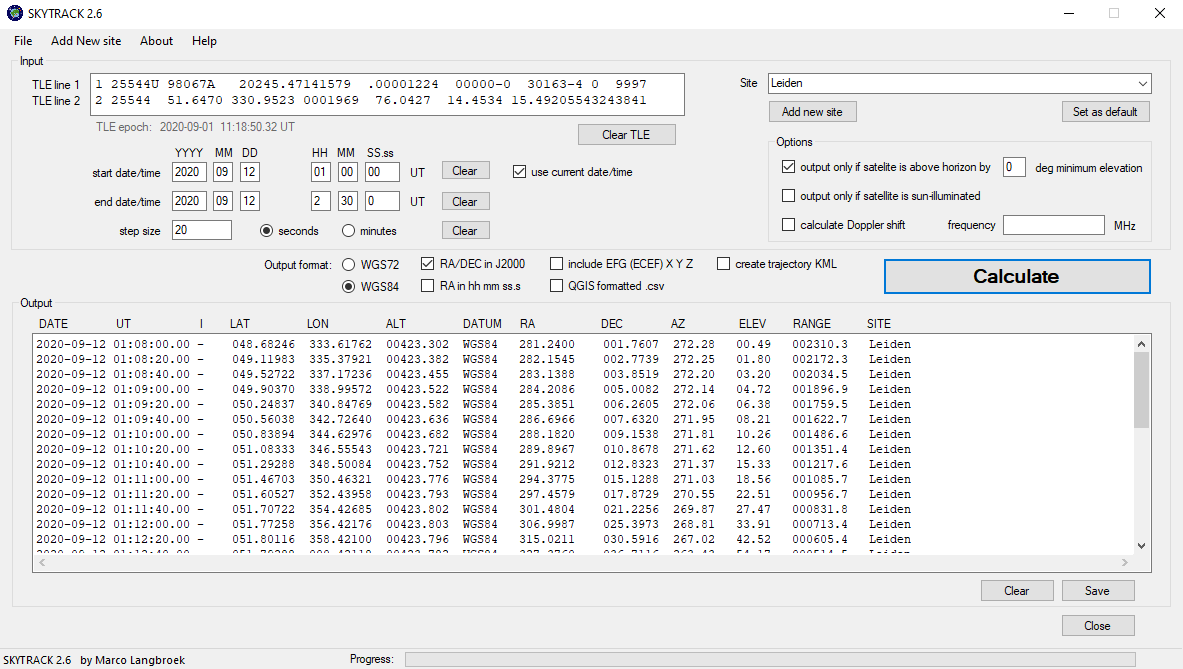
In short, the software takes as input a set of orbital elements in TLE-format, and allows you to calculate, for a given custom time interval in custom time steps:

- The latitude, longitude and altitude of the satellite;

- An indication whether it is sun-illuminated or not;

- the Right Ascension (RA) and Declination in the sky, for your observing site;

- the Azimuth and Elevation in the sky, for your observing site;

- the Range (in km) to your observing site;

...and optionally also:

- a KML file of the trajectory that you can load into Google Earth;

- the Doppler-corrected radio frequency (for a given central frequency);

- EFG (ECEF) x, y, z coordinates of the satellite;

- format the data as .csv so it can easily be imported into mapping applications like QGIS.

- choice between various output formats and Datums for the Lat/Lon and RA/DEC data

The software also has options to restrict the output to a certain minimum elevation as sen from your observing site, and/or output only when the satellite is sun-illuminated (and hence visible).


Thursday, 11 June 2020

SkyTrack: a simple tool to calculate satellite positions and visuallize satellite trajectories in Google Earth


Over the past years I have written a number of simple software tools to ease some of my data analysis. Some of these I have released into the wild through my software webpage. Others, which are more experimental, I keep to myself for now.

This week I have released another tool into the wild: SkyTrack.

SkyTrack (now in version 2.5) was initially written by me to quickly create a datafile with geographic coordinates of the trajectory of a satellite, in a format that is easy to import in QGIS, the mapping application that I use to make the trajectory maps that you frequently see in my blog posts.

It has since evolved and is starting to get to a point where it might be useful to others, hence why I release it now.

The output of the program is numerical (a table with data), not graphical, which will limit the usefulness to many people. However, as of the latest version (2.5) the program has the option to generate a .kml file of the trajectory for import in Google Earth (if Google Earth is installed on your pc, it will actually auto-open it and load the .kml, after saving).

When the .kml is loaded into Google Earth, the resulting images look like this:


The program takes lines 1 and 2 of a TLE as input (you copy/paste them into the input textbox). You then provide it with a time window, a desired time step, and an observing site.

It will then calculate the ground-track (the subsatellite-point) over that time window, in the given time steps; it will also calculate the altitude above the Earth at each time instance; the range to the observing site and the satellite's position in both RA/DEC and azimuth/elevation as seen from the observing site. It will also provide an indication whether the satellite is sun-illuminated at each time instance

As optional output, the program can add EFG (ECEF) X, Y, Z coordinates, as well as the EFG velocity vector. It can also calculate the Doppler-shift corrected radio frequency for the satellite, if a center frequency is given.

There are also options to restrict the program to only provide output when the satellite is a specified distance in degrees above the horizon as seen from the observing site, and/or only provide output when the satellite is sun-illuminated.

There are a number of options as well regarding the output format. A pdf with the download provides instructions for use.

The program is currently only available for 64-bits Windows. It employs Microsoft's .NET framework, and SGP4 DLL's that are courtesy of the US AFSPC.

For the future, I want to add some direct graphical output options, but it might take a while before I get to that. So far, development of this tool was largely done when the need for a specific feature arose.